
Last Updated: September 21, 2026
Author: Public Evidence Editorial Team
Reviewed for accuracy: Technical recommendations were checked against current documentation from AWS, Microsoft, Google Cloud and Apache Spark, plus peer-reviewed ETL research.
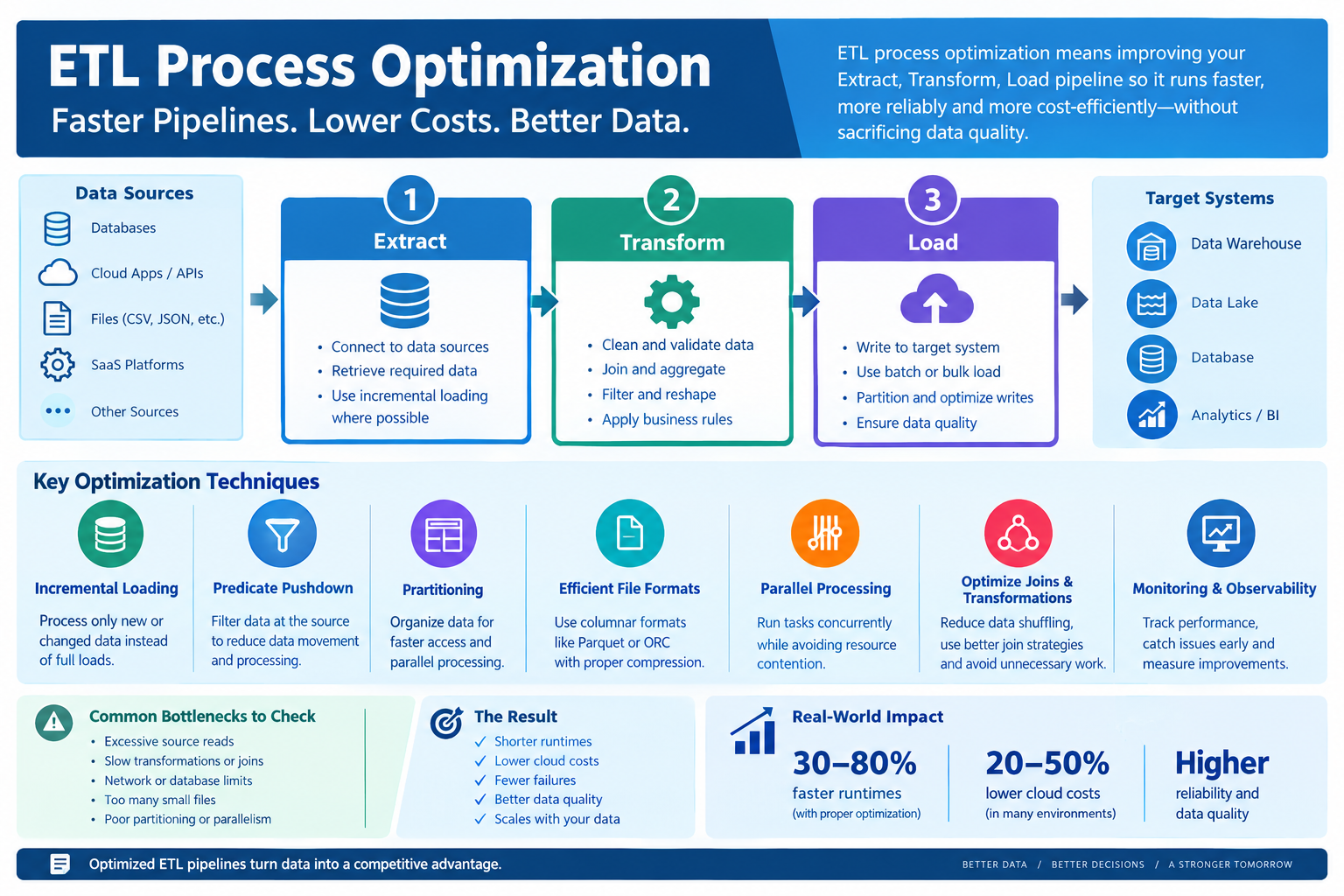
ETL process optimization is the practice of making an Extract, Transform, Load pipeline faster, more reliable and more cost-efficient without sacrificing data correctness. The most effective approach is not simply adding more servers: first measure the pipeline, find its actual bottleneck, then reduce unnecessary data movement, computation, storage I/O and failed reruns.
Modern ETL optimization commonly relies on incremental extraction, predicate pushdown, partitioning, efficient file formats, parallel processing, optimized joins, appropriate transformation engines and strong monitoring. AWS, Microsoft, Google Cloud and Apache Spark all document versions of these techniques for production data workloads.
What does ETL process optimization actually involve?
ETL stands for Extract, Transform and Load.
- Extract: retrieve data from databases, APIs, files, SaaS platforms or other sources.
- Transform: clean, join, filter, aggregate, validate or reshape the data.
- Load: write the processed data into a warehouse, lake, database or another destination.
Optimization means improving one or more of those stages while preserving the required data quality and business rules.
A useful optimization target is not simply “finish faster.” A production pipeline might instead have several objectives:
| Goal | Example metric |
|---|---|
| Speed | Runtime or records/second |
| Freshness | Data latency |
| Reliability | Successful-run percentage |
| Cost | Cost per run or per GB processed |
| Scalability | Performance as data volume grows |
| Quality | Error, duplicate or reconciliation rate |
| SLA | Percentage of runs completed before deadline |
AWS recommends establishing performance goals and a baseline before changing tuning parameters. Its documented workflow is to measure, identify bottlenecks, reduce their impact and repeat the process.
Why does an ETL pipeline become slow over time?
A pipeline that worked well with 50 GB of data can behave very differently at 500 GB or 5 TB.
Common causes include:
- Full-table extraction when only a small portion changed.
- Too many small files.
- Reading columns that downstream jobs never use.
- Filtering data after it has already been transferred.
- Expensive joins and aggregations.
- Excessive data shuffling.
- Poor partitioning.
- Too much or too little parallelism.
- Row-by-row processing.
- Slow source or destination databases.
- Network bandwidth limits.
- Driver or worker memory pressure.
- Reprocessing data after failures.
- Poorly chosen file formats.
- Repeated transformations across different jobs.
The critical point is that the slowest-looking step isn’t necessarily the root cause.
For example, a transformation may appear slow because it receives far more data than necessary. Filtering the source first can improve that transformation without changing its code.
AWS specifically recommends inspecting metrics and the Spark UI before applying tuning techniques.
How should you diagnose an ETL bottleneck before changing anything?
Start with a baseline.
Record at least:
- Total runtime.
- Extract duration.
- Transform duration.
- Load duration.
- Input data volume.
- Output data volume.
- Rows processed.
- CPU utilization.
- Memory utilization.
- Network throughput.
- Read/write I/O.
- Failure and retry counts.
- Cloud or infrastructure cost where available.
Then compare the pipeline’s stages.
For example:
| Stage | Runtime | Data processed | Possible signal |
|---|---|---|---|
| Extract | 18 min | 800 GB | Excessive source scan |
| Transform | 7 min | 800 GB | Not necessarily the bottleneck |
| Load | 42 min | 120 GB | Destination throughput problem |
In that example, rewriting transformations first would probably miss the largest problem.
Microsoft’s Data Factory documentation similarly recommends using a representative test dataset and establishing a baseline before tuning copy performance. Microsoft says the test data should represent typical folder structure, file patterns and schema; its guidance suggests a test large enough to make performance characteristics measurable.
A simple bottleneck decision tree
If source reads are high:
Look at incremental extraction, filtering, partition pruning and column selection.
If CPU is saturated:
Look at expensive transformations, UDFs, joins and serialization.
If network is saturated:
Reduce data movement, use pushdown and review source-target placement.
If memory is exhausted:
Look for oversized partitions, skewed operations, large joins and unnecessary caching.
If the destination is slow:
Investigate bulk loading, partitioning, indexes, write concurrency and destination capacity.
If the pipeline fails repeatedly:
Improve checkpointing, idempotency, retry handling and observability.
Can incremental loading make ETL significantly faster?
Yes, when the workload contains identifiable new or changed records.
A full load might read a 2 TB table every night even though only 20 GB changed. An incremental design can process the changed portion instead.
Common approaches include:
- Change Data Capture (CDC)
- Timestamp-based extraction
- Increasing sequence IDs
- Transaction logs
- Source-system change flags
- Warehouse merge/upsert patterns
- Tool-specific checkpoints or bookmarks
AWS Glue, for example, provides job bookmarks that track previously processed data so subsequent runs can process new data rather than automatically scanning the entire dataset again.
Incremental processing also reduces downstream work. If only 1% of the source changed, there’s little reason to perform the same expensive transformations on the other 99% unless business rules require a complete rebuild.
What is predicate pushdown, and why does it help ETL performance?
Predicate pushdown means applying filtering as close to the data source as practical instead of retrieving unnecessary data and filtering it later.
Suppose a pipeline needs only January transactions.
A less efficient pattern is:
Source → Read all transactions → Send to processing engine → Filter January
A better pattern is:
Source → Filter January → Transfer required records → Process
AWS describes pushdown as moving retrieval logic closer to the source so the processing engine doesn’t have to receive and process unnecessary data.
This can reduce:
- Data scanned.
- Network transfer.
- Executor workload.
- Memory pressure.
- Transformation time.
The same principle applies to columns. If a downstream model needs five columns, don’t extract 80 columns simply because they exist.
Does partitioning always make an ETL pipeline faster?
No. Good partitioning can reduce data scans and enable parallel work, but excessive or poorly chosen partitioning can create overhead.
Partitioning divides data according to a chosen key such as:
- Date
- Region
- Customer ID
- Tenant
- Numeric range
AWS documents partition pruning as a way to restrict how much data downstream applications need to scan.
For example:
/year=2026/month=09/day=21/
A query requesting September 21 can potentially avoid scanning unrelated partitions.
But partitioning has trade-offs.
Too few partitions can limit parallelism. Too many partitions can create metadata and task-management overhead. AWS specifically warns that large numbers of small files and partitions can increase Spark driver planning overhead.
The right question is therefore not:
“How many partitions should I create?”
It is:
“What partition layout lets my most important workloads avoid unnecessary scans without creating excessive task and metadata overhead?”
Which file formats help ETL performance?
For analytical workloads, columnar formats such as Apache Parquet and ORC can reduce the amount of data read because engines can access only required columns and benefit from compression and encoding.
AWS recommends considering file size, compression, format and layout when reducing data scans. Its guidance identifies Parquet and ORC as common columnar formats for distributed processing.
File size matters too.
Thousands or millions of tiny files can create substantial overhead because the processing engine has to manage many objects and tasks. AWS specifically discusses small-file overhead as a source of network, processing and planning costs.
So optimization isn’t simply:
“Use Parquet.”
It is:
Choose an appropriate format + compression + file size + partition layout for the workload.
How does parallel processing improve ETL?
Parallelism allows independent work to happen simultaneously.
For example, instead of processing four independent partitions sequentially:
Partition A → B → C → D
a distributed system can process them concurrently:
A ┐B ├→ processing workersC ┤D ┘
Microsoft Data Factory supports parallel copy at multiple levels and allows copy activities to use multiple threads.
AWS also identifies task parallelization as a core Spark optimization strategy.
But more parallelism is not automatically better.
Too many concurrent operations can overwhelm:
- The source database.
- Destination database.
- Network.
- Integration runtime.
- Worker memory.
- Storage I/O.
Microsoft explicitly warns that excessive parallel copies can hurt performance and recommends tuning concurrency while considering source and destination load.
The practical approach is to increase concurrency gradually and measure throughput.
What ETL transformations usually need the most tuning?
The expensive operations are often those that require large amounts of data movement or computation.
Joins
Large joins can cause shuffles in distributed engines. AWS describes joins as a common shuffle operation and recommends filtering rows and columns before the join to reduce the amount of data transferred during the shuffle.
Aggregations
Operations such as GROUP BY can require data redistribution. Reduce the input first where the business logic allows it.
Sorting
Sorting large datasets can be expensive. Don’t sort data unless downstream requirements actually need ordering.
User-defined functions
Custom Python UDFs can introduce overhead in Spark workloads. AWS recommends considering built-in Spark SQL/DataFrame functions where possible because they can benefit from optimized execution.
Repeated transformations
If five jobs independently perform the same expensive cleanup operation, consider whether the cleaned result can be reused.
How can Spark ETL jobs be optimized?
Apache Spark provides several built-in performance mechanisms, including partition tuning, statistics, join optimization and Adaptive Query Execution (AQE).
AQE can use runtime statistics to adjust execution plans during query execution. In current Spark documentation, AQE is enabled by default since Spark 3.2.0.
Useful Spark optimization areas include:
- Partition sizing.
- Join strategy.
- Broadcast joins where appropriate.
- Shuffle reduction.
- Data skew.
- Column pruning.
- Predicate pushdown.
- Statistics.
- AQE.
- Avoiding unnecessary caching.
Don’t start by changing dozens of Spark configuration values.
First inspect the execution plan and Spark UI. Then change one meaningful variable and compare the result with the baseline.
How should ETL loading be optimized?
The load stage is often overlooked.
Common improvements include:
- Bulk loading instead of row-by-row inserts.
- Batch writes.
- Appropriate write parallelism.
- Destination partitioning.
- Staging where it improves throughput.
- Avoiding unnecessary indexes during large loads when the database design permits it.
- Loading into an efficient intermediate format.
- Using destination-native ingestion features.
Microsoft’s documentation shows that copy throughput depends on source performance, destination performance and the network between them. It also documents parallel copy and throughput optimization features.
Google Cloud’s Spanner documentation likewise recommends partitioning large bulk-load workloads so writing can be distributed across worker tasks.
Is ETL optimization the same as ELT optimization?
No.
Traditional ETL transforms data before loading it into the target system.
ELT extracts data, loads it into a target platform and performs transformations there.
| Characteristic | ETL | ELT |
|---|---|---|
| Transformation location | Before target load | Usually in target platform |
| Common strength | Controlled preprocessing | Scalable warehouse/lakehouse compute |
| Network consideration | Transform before loading | Raw data may be loaded first |
| Best fit | Certain integration and preprocessing workloads | Many modern cloud analytics architectures |
| Main optimization focus | Extraction, transformation engine, load | Data layout, warehouse compute and transformation SQL |
IBM’s current ETL guidance notes that the ETL-versus-ELT decision has become increasingly relevant as organizations move workloads into cloud data warehouses.
There is no universal winner.
If your destination system is highly optimized for SQL transformations, ELT can make sense. If data must be cleaned, filtered or transformed before entering the target, traditional ETL can still be appropriate.
How do you reduce ETL cloud costs without simply making the job slower?
Cost optimization and performance optimization should be considered together.
Track at least:
Cost per pipeline run
and, where practical:
Cost per GB processed
and:
Cost per successful output
Then look for wasted work.
The highest-value cost reductions often come from:
- Processing less data.
- Avoiding repeated full loads.
- Reducing unnecessary transformations.
- Avoiding excessive worker capacity.
- Controlling excessive parallelism.
- Reducing retries and failed reruns.
- Optimizing file layout.
- Scheduling expensive jobs only when needed.
Google Cloud recommends running smaller experiments before large batch jobs to estimate costs and uncover potential failure points. Its documentation notes that cost scaling can be nonlinear, so small tests should be treated as estimates rather than exact forecasts.
What monitoring should an optimized ETL pipeline have?
An optimized pipeline that nobody can observe won’t stay optimized for long.
Monitor:
- Runtime by stage.
- Input/output rows.
- Input/output bytes.
- Throughput.
- CPU utilization.
- Memory utilization.
- Network utilization.
- Shuffle volume.
- Failed tasks.
- Retry counts.
- Data-quality failures.
- Data freshness.
- Cost.
- SLA compliance.
Set alerts around business impact, not just infrastructure metrics.
For example:
“Pipeline exceeded 30-minute SLA”
is often more useful to a business than:
“CPU exceeded 80%.”
The CPU alert can help engineers diagnose the problem, but the SLA alert tells the team that the actual service requirement was missed.
Google Cloud’s Dataflow documentation similarly emphasizes defining and measuring service-level objectives for pipeline performance and reliability.
What are the most common ETL optimization mistakes?
1. Adding more compute before diagnosing the bottleneck
More workers won’t fix a source database throttling problem.
2. Increasing parallelism blindly
Concurrency can improve throughput until the source, destination or network becomes the limiting factor.
3. Partitioning everything
Bad partition keys can produce uneven workloads or excessive metadata.
4. Using full loads for every run
If only a small amount of data changes, repeatedly processing the entire dataset wastes resources.
5. Filtering too late
Moving unnecessary records through the network and transformation engine increases work.
6. Ignoring small files
A large dataset split into excessive numbers of tiny files can create planning and task overhead.
7. Optimizing runtime while breaking data quality
A pipeline that finishes in ten minutes but silently drops records is not optimized.
8. Changing too many parameters at once
If five settings change and runtime improves, you don’t know which change actually helped.
9. Measuring only average runtime
A pipeline can have a good average while repeatedly missing its SLA during peak loads.
10. Ignoring failure recovery
A 20-minute pipeline that must restart from zero after a failure can be more expensive than a slightly slower pipeline with reliable checkpoints.
What is a practical ETL optimization workflow for 2026?
Use this sequence rather than tuning randomly.
Step 1: Define the target
Write down the actual requirement.
Example:
“The daily pipeline must process the previous day’s transactions and finish within 25 minutes.”
Step 2: Establish the baseline
Record runtime, data volume, throughput, cost and failures.
Step 3: Find the bottleneck
Determine whether the problem is:
- Source I/O
- Network
- Transformation CPU
- Memory
- Shuffle
- Destination I/O
- Orchestration
- Failure/retry overhead
Step 4: Reduce the amount of work
Try:
- Incremental extraction.
- Column pruning.
- Predicate pushdown.
- Partition pruning.
- Early filtering.
Step 5: Optimize computation
Review:
- Joins.
- Aggregations.
- UDFs.
- Serialization.
- Data skew.
- Query plans.
Step 6: Tune parallelism
Increase concurrency gradually while watching source, destination and worker utilization.
Step 7: Improve storage and loading
Review:
- File format.
- File size.
- Partition layout.
- Bulk loading.
- Destination throughput.
Step 8: Test again
Compare the new result with the original baseline.
Step 9: Verify data correctness
Check:
- Row counts.
- Totals.
- Duplicates.
- Nulls.
- Referential relationships.
- Business-rule checks.
Step 10: Document the winning configuration
Record what changed and why.
That makes the optimization repeatable instead of turning it into tribal knowledge.
Which ETL optimization techniques usually have the biggest impact?
There is no universal ranking because the bottleneck determines the appropriate fix. A practical decision matrix is more useful:
| Bottleneck | First techniques to investigate |
|---|---|
| Excessive source reads | Incremental loading, pushdown, column pruning |
| Large file scans | Partition pruning, Parquet/ORC, compression |
| Too many tiny files | Compaction, better file sizing |
| Slow joins | Filter before join, join strategy, partitioning |
| CPU-heavy transformations | Built-in functions, simpler transformations, parallelism |
| Memory pressure | Partition sizing, reduce data volume, avoid unnecessary caching |
| Slow network | Pushdown, data locality, less data movement |
| Slow database writes | Bulk loading, batching, controlled parallel writes |
| Uneven task duration | Data-skew analysis, repartitioning, AQE |
| Long startup/planning | Reduce small files and excessive partitions |
| Repeated processing | Incremental loads, checkpoints, bookmarks |
| Frequent failures | Idempotency, checkpoints, retries and observability |
AWS’s current performance guidance similarly groups Spark optimization around data-scan reduction, parallelization, shuffle optimization, planning overhead and UDF optimization.
What should you measure after optimizing an ETL pipeline?
Never stop at “the job is faster.”
Compare before and after:
| Metric | Before | After |
|---|---|---|
| Runtime | Record baseline | Record new result |
| Data scanned | Record baseline | Record new result |
| Data transferred | Record baseline | Record new result |
| CPU time | Record baseline | Record new result |
| Memory peak | Record baseline | Record new result |
| Cost/run | Record baseline | Record new result |
| Failed runs | Record baseline | Record new result |
| Data-quality errors | Record baseline | Record new result |
| SLA compliance | Record baseline | Record new result |
The important point is that the before/after values must come from your actual pipeline. Generic claims such as “partitioning makes ETL 10× faster” are not useful without workload-specific evidence.
What is the best way to optimize ETL without breaking data quality?
Treat performance and correctness as two constraints.
Every optimization should answer two questions:
Did the pipeline get faster or cheaper?
and:
Did it produce the same required result?
For important pipelines, validate:
- Source-to-target row counts.
- Aggregate totals.
- Primary-key uniqueness.
- Null-rate changes.
- Referential integrity.
- Duplicate records.
- Accepted/rejected record counts.
- Business-rule outcomes.
A faster pipeline that produces incomplete data is a failed optimization.
Academic ETL research also treats optimization as a workflow-design problem involving execution efficiency, quality metrics and alternative workflow designs rather than simply reducing runtime.
ETL process optimization checklist
Before calling an ETL pipeline “optimized,” verify:
- Performance target is defined.
- Baseline metrics are recorded.
- The actual bottleneck is identified.
- Unnecessary data is filtered early.
- Incremental extraction is used where appropriate.
- Required columns are selected instead of extracting everything.
- Partitioning matches workload access patterns.
- Small-file problems are controlled.
- Appropriate columnar formats are used for analytical workloads.
- Joins are measured and optimized.
- Parallelism is tested rather than guessed.
- Source and destination throttling is monitored.
- Loading uses efficient batch/bulk mechanisms where appropriate.
- Failures can recover without unnecessary full reruns.
- Data quality is checked after optimization.
- Cost is measured.
- SLA compliance is measured.
- The final configuration is documented.
Frequently Asked Questions
What is ETL process optimization?
ETL process optimization means improving an Extract, Transform, Load pipeline so it processes the required data faster, more reliably and with less resource consumption while maintaining data correctness. The process should begin with measurement and bottleneck identification rather than arbitrary configuration changes.
How can I make an ETL process faster?
Start by measuring the pipeline. Then reduce unnecessary data scans with incremental extraction, filtering, column pruning and partition pruning. After that, optimize joins and transformations, tune parallelism, improve file layout and optimize the destination load path.
What is the most important ETL optimization technique?
There is no single technique that is best for every pipeline. If a job repeatedly processes unchanged data, incremental loading can remove large amounts of unnecessary work. If the bottleneck is a large Spark join, reducing shuffle and improving the join strategy may matter more. Optimization should follow the measured bottleneck.
Does partitioning improve ETL performance?
Partitioning can improve performance when it allows the engine to scan only the relevant data or process independent partitions concurrently. Poor partitioning can also create excessive files, metadata and task overhead, so partition design should match actual query and pipeline access patterns.
Is ETL or ELT better for performance?
Neither is universally faster. ETL transforms data before loading, while ELT generally loads data first and uses the destination platform for transformations. The better architecture depends on the source systems, destination engine, transformation workload, data volume, latency requirements and governance constraints.
How do I know whether my ETL optimization actually worked?
Compare the optimized pipeline with a documented baseline. Measure runtime, data scanned, throughput, resource usage, cost, failures, data quality and SLA compliance. A reduction in runtime alone is not enough if the pipeline becomes less reliable or produces incorrect data.
Primary technical sources
The following primary documentation is useful for validating and implementing the techniques discussed above:
- AWS Prescriptive Guidance — Spark performance tuning
- AWS — Reduce the amount of data scanned
- AWS — Optimize Spark shuffles
- Microsoft — Data Factory copy performance and scalability
- Google Cloud — Dataflow pipeline best practices
- Apache Spark — SQL performance tuning
- AWS Glue — Job bookmarks
Editorial freshness note
Revisit this article in 3–6 months. Cloud ETL services, Spark releases, orchestration platforms and pricing change frequently. At the next review, re-check AWS Glue, Microsoft Data Factory/Fabric, Google Cloud Dataflow and Apache Spark documentation, especially performance defaults and configuration behavior.
Learn 12 practical ETL optimization techniques to reduce runtime, data scans, cloud costs and pipeline failures without sacrificing data quality.