
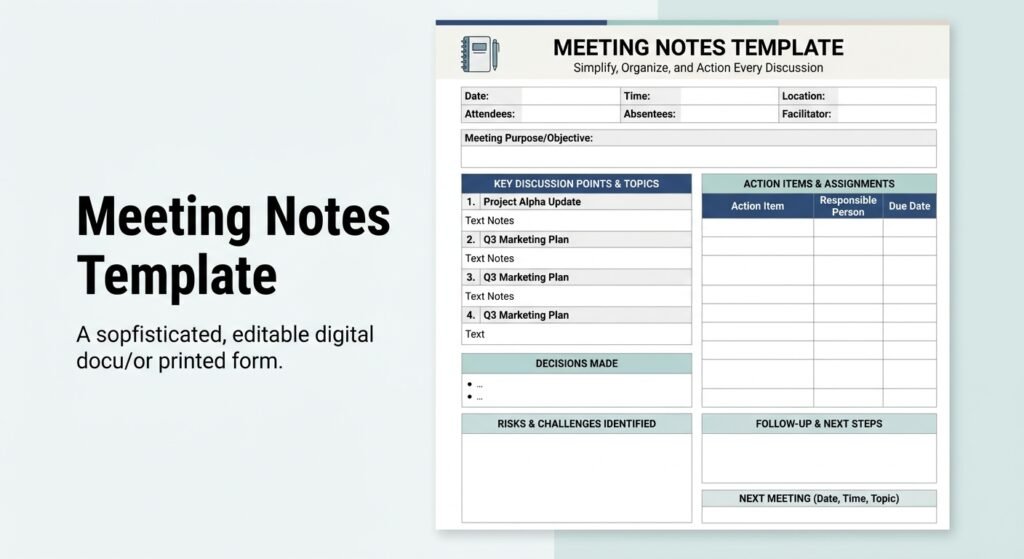
A meeting notes template is a reusable document for recording a meeting’s purpose, attendees, key discussion points, decisions, action items, responsible people, and deadlines. It helps teams remember what was agreed, track responsibilities, and follow up after the meeting.
The best meeting notes are not full transcripts. They capture the information people need to understand what happened, what was decided, and what happens next.
Free Meeting Notes Template
Copy this template into Google Docs, Microsoft Word, Notion, or your preferred note-taking app.
Meeting Information
Meeting title:
[Enter meeting name]
Date:
[Date]
Time:
[Start time – End time]
Location / Meeting link:
[Location or link]
Facilitator:
[Name]
Note taker:
[Name]
Attendees:
[Names]
Meeting Objective
Purpose:
[What should this meeting accomplish?]
Agenda
- [Agenda item]
- [Agenda item]
- [Agenda item]
Key Discussion Points
Topic 1:
[Important information discussed]
Topic 2:
[Important information discussed]
Topic 3:
[Important information discussed]
Decisions Made
- [Decision]
- [Decision]
- [Decision]
Action Items
| Action item | Owner | Due date | Status |
|---|---|---|---|
| [Task] | [Name] | [Date] | Not started |
| [Task] | [Name] | [Date] | In progress |
| [Task] | [Name] | [Date] | Complete |
Open Questions
- [Question]
- [Question]
Next Steps
- [Next step]
- [Next step]
Next meeting:
[Date and time]
What Should Meeting Notes Include?
A useful meeting notes document normally includes:
- Meeting details — title, date, time, location, and attendees.
- Purpose — why the meeting is taking place.
- Agenda — the topics that need attention.
- Key points — important information from the discussion.
- Decisions — what the participants agreed to do.
- Action items — tasks that must be completed.
- Owners — the person responsible for each task.
- Deadlines — when tasks should be completed.
- Next steps — what happens after the meeting.
You do not need every section for every meeting. A five-minute check-in may only need key points, decisions, and action items.
How to Take Meeting Notes
The easiest way to take effective meeting notes is to listen for information, decisions, actions, and deadlines rather than trying to record every sentence.
Before the meeting
Prepare your template before the meeting begins.
Add the meeting title, date, attendees, and agenda. If you already know the discussion topics, add them as headings.
This lets you concentrate on the conversation instead of formatting the document while people are speaking.
During the meeting
Write short, meaningful notes.
For example:
Weak note:
“Everyone talked about the website homepage and there were several different opinions about how it should look.”
Better note:
“Team approved simpler homepage layout. Sarah will prepare revised design by Friday.”
The second version records the useful outcome instead of the entire conversation.
After the meeting
Review the notes as soon as possible.
Check that:
- Decisions are clearly identified.
- Every important task has an owner.
- Deadlines are recorded.
- Open questions are easy to find.
- Next steps are clear.
Then share the appropriate notes with the people who need them.
Meeting Notes Template for Work
A workplace meeting often focuses on progress, problems, decisions, and tasks.
Use this structure:
Meeting: Weekly Team Meeting
Date: [Date]
Attendees: [Names]
Progress
- [Update]
- [Update]
Current Priorities
- [Priority]
- [Priority]
Problems or Blockers
- [Problem]
- [Problem]
Decisions
- [Decision]
- [Decision]
Action Items
| Task | Owner | Deadline |
|---|---|---|
| [Task] | [Name] | [Date] |
| [Task] | [Name] | [Date] |
Follow-Up
[What should be reviewed at the next meeting?]
This format works well for weekly team meetings because it keeps attention on progress and measurable next steps.
Team Meeting Notes Template
For recurring team meetings, simplicity matters.
A practical team meeting template can use five sections:
Updates
What changed since the last meeting?
Priorities
What should the team focus on next?
Blockers
What is slowing down progress?
Decisions
What did the team agree to do?
Action Items
Who needs to do what, and when?
Because the same structure can be reused, team members quickly learn where to find important information.
Client Meeting Notes Template
Client meetings need clear records because requirements, expectations, and deadlines can affect the final project.
Use:
Client: [Name]
Company: [Company]
Date: [Date]
Attendees: [Names]
Client Goals
- [Goal]
- [Goal]
Requirements
- [Requirement]
- [Requirement]
Questions
- [Question]
- [Question]
Concerns
- [Concern]
- [Concern]
Decisions
- [Decision]
- [Decision]
Deliverables
| Deliverable | Owner | Due date |
|---|---|---|
| [Deliverable] | [Name] | [Date] |
| [Deliverable] | [Name] | [Date] |
Next Steps
- [Step]
- [Step]
Be specific when documenting client requirements.
Instead of:
“Client wants website changes.”
Write:
“Client requested a shorter homepage hero section and wants the revised copy by Friday.”
The second note provides a clear action and deadline.
Project Meeting Notes Template
Project meetings usually require information about progress, risks, blockers, and milestones.
Project: [Project name]
Date: [Date]
Meeting lead: [Name]
Project Status
Status: On track / At risk / Delayed
Completed Work
- [Completed item]
- [Completed item]
Current Work
- [Current task]
- [Current task]
Blockers
- [Blocker]
- [Blocker]
Risks
- [Risk]
- [Risk]
Decisions
- [Decision]
- [Decision]
Action Items
| Task | Owner | Priority | Deadline |
|---|---|---|---|
| [Task] | [Name] | High | [Date] |
| [Task] | [Name] | Medium | [Date] |
Next Milestone
[Milestone and target date]
One-on-One Meeting Notes Template
A one-on-one meeting usually focuses on progress, feedback, challenges, and goals.
Employee: [Name]
Manager: [Name]
Date: [Date]
Current Priorities
- [Priority]
- [Priority]
Progress
- [Update]
- [Update]
Challenges
- [Challenge]
- [Challenge]
Feedback
- [Feedback]
- [Feedback]
Goals
- [Goal]
- [Goal]
Action Items
- [Person] — [Task] — [Deadline]
Follow-Up
[Next meeting date]
This structure provides enough organization without making a one-on-one conversation feel like a formal report.
Meeting Notes vs. Meeting Minutes
Meeting notes are generally informal records of important discussion points, decisions, tasks, and follow-up information.
Meeting minutes are more formal records of a meeting’s proceedings. They may document attendees, motions, votes, official decisions, and other organizational actions.
| Meeting Notes | Meeting Minutes |
|---|---|
| Usually informal | Usually formal |
| Focus on useful information | Record official proceedings |
| Flexible structure | More structured |
| Often used by teams | Common in boards and committees |
| Can include reminders | May document formal decisions |
For ordinary workplace meetings, meeting notes are often sufficient. Formal organizations may require official minutes.
How Detailed Should Meeting Notes Be?
Meeting notes should contain enough detail to explain the outcome without becoming a transcript.
A useful test is this:
Could someone who missed the meeting understand the important decisions and next steps from these notes?
If the answer is yes, the notes are probably detailed enough.
For a short status meeting, a few bullet points may be sufficient. A project planning session may need decisions, risks, dependencies, owners, and deadlines.
How to Write Better Action Items
A strong action item identifies:
Who + What + When
For example:
Poor:
“Review the proposal.”
Better:
“James will review the proposal and send comments by September 15.”
The second version removes uncertainty.
For larger projects, you can also add priority and status.
| Task | Owner | Deadline | Priority | Status |
|---|---|---|---|---|
| Review proposal | James | Sept. 15 | High | In progress |
What Is the Best Meeting Notes Format?
For most meetings, the best format is:
Meeting details → Purpose → Agenda → Key points → Decisions → Action items → Owners → Deadlines → Next steps
This structure works because it follows the natural flow of a meeting.
It also makes the document easy to scan later.
If your meeting has a specific purpose, adjust the template rather than adding unnecessary sections.
How to Organize Meeting Notes
If you attend several meetings each week, consistent organization can save significant time.
Use a predictable file name such as:
Project Name — Meeting Type — Date
Example:
Website Redesign — Weekly Meeting — September 10, 2026
Keep recurring meetings in the same folder or workspace. You can also maintain a separate action-item tracker if tasks from several meetings feed into the same project.
Common Meeting Notes Mistakes
Writing a transcript
Trying to capture every word can make the notes difficult to read.
Focus on outcomes.
Recording a decision as an idea
A suggestion is not automatically a decision. Mark approved decisions clearly.
Leaving out task owners
Every important action should have a responsible person.
Forgetting deadlines
A task without a deadline is harder to track.
Using vague language
Write specific actions instead of phrases such as “follow up” or “work on this.”
Delaying the review
Small details can become unclear if you wait several days before cleaning up the notes.
Sharing everything
Not every private comment belongs in a shared document. Consider the audience and sensitivity of the information.
Meeting Notes Example
Imagine a marketing team meeting about a new product launch.
Discussion
The team reviewed the launch schedule, email campaign, landing page, and social media content.
Decisions
- Product launch remains scheduled for October 1.
- The landing page will use the new product images.
- The email campaign will be reviewed before publication.
Action Items
| Task | Owner | Deadline |
|---|---|---|
| Update landing page | Sarah | Sept. 18 |
| Review email campaign | James | Sept. 20 |
| Prepare social posts | Maria | Sept. 22 |
This example shows the difference between documenting the entire conversation and recording information that supports execution.
Best Tools for Meeting Notes
You can create a meeting notes template in almost any productivity platform.
Google Docs
Useful when several people need to access or edit the same document.
Microsoft Word
A practical choice for teams that already use Microsoft Office.
Notion
Useful when meeting notes need to connect with projects, tasks, databases, or team documentation.
Spreadsheets
A spreadsheet can work well when your main goal is tracking action items, owners, deadlines, and status.
The best tool is usually the one your team can access and use consistently.
How to Make Meeting Notes More Useful
A few simple habits can improve almost any meeting notes system.
Use consistent headings
Keep decisions, action items, and discussion points in predictable locations.
Highlight ownership
Make the responsible person obvious.
Use dates
Record actual deadlines instead of phrases such as “next week.”
Separate decisions from discussion
This prevents ideas from being mistaken for approved plans.
Keep paragraphs short
Bullets and tables are often easier to scan than large blocks of text.
Review old notes
For recurring meetings, check previous action items before starting the next meeting.
Frequently Asked Questions
What is a meeting notes template?
A meeting notes template is a reusable structure for recording meeting details, discussion points, decisions, action items, responsible people, deadlines, and next steps. It helps teams create consistent records without starting from a blank document.
What should meeting notes include?
Meeting notes should usually include the date, attendees, purpose, agenda, important discussion points, decisions, action items, owners, deadlines, and next steps. You can add project status, risks, questions, or client requirements when they are relevant.
What is the difference between meeting notes and meeting minutes?
Meeting notes are usually informal and focus on useful information and follow-up. Meeting minutes are generally more formal and may document official proceedings, motions, votes, and organizational decisions.
How do you take meeting notes effectively?
Prepare the template before the meeting and focus on important information, decisions, action items, owners, and deadlines. Avoid trying to record every sentence. Afterward, review the notes and clarify anything that is unclear.
How do you write an action item?
Write the responsible person, specific task, and deadline. For example: “Sarah will update the landing page by September 18.” This makes responsibility and timing clear.
Should meeting notes be shared?
Important decisions and action items should usually be shared with the people who need them. However, private or sensitive information may not belong in a general meeting record.
How detailed should meeting notes be?
They should be detailed enough for someone to understand the important outcomes without reading a transcript. The ideal level depends on the meeting’s purpose, complexity, and audience.
Can I use one meeting notes template for every meeting?
Yes, but customization can make it more useful. A team meeting may need progress and blockers, while a client meeting may require requirements, deliverables, and deadlines.
Quick Meeting Notes Checklist
Before considering your notes complete, check:
- Meeting purpose is clear
- Attendees are recorded
- Important discussion points are included
- Decisions are separated from ideas
- Every major action has an owner
- Deadlines are recorded
- Open questions are identified
- Next steps are clear
- The notes are organized and easy to scan
- The appropriate people can access them
Final Answer: What Makes a Good Meeting Notes Template?
A good meeting notes template should make it easy to capture five things: why the meeting happened, what was discussed, what was decided, who needs to act, and when the work is due.
You do not need a complicated system. Start with meeting details, key points, decisions, and action items. Then add sections for risks, project status, client requirements, or follow-up when needed.
The goal is simple: when the meeting ends, everyone should know what happens next.
Use this free meeting notes template for work, team, client, and project meetings. Get practical examples, action-item formats, FAQs, and note-taking tips.