






A video of a politician saying something shocking. A photograph of a celebrity appearing somewhere they never visited. An audio recording that sounds exactly like someone you know.
Is it real?
Not necessarily.
Artificial intelligence can now create remarkably convincing images, videos, and audio, making it harder to distinguish genuine digital content from manipulated or completely synthetic media. These deepfakes can be used for entertainment and creative work, but they can also support scams, misinformation, impersonation, fraud, and reputational attacks.
The good news is that you don’t have to become an AI expert to investigate suspicious content.
You can start by checking where the content came from, when it appeared, whether independent sources confirm it, and whether the evidence itself contains inconsistencies.
What Is an AI Deepfake?Learn how to spot AI deepfakes, verify digital evidence, identify manipulated images and videos, and determine whether online content can be trusted.
A deepfake is synthetic or manipulated media created or altered using artificial intelligence.
Deepfakes can involve:
- AI-generated faces
- Face-swapped videos
- Cloned voices
- Manipulated photographs
- AI-generated people
- Altered speeches
- Synthetic interviews
- Edited or fabricated audio recordings
Some manipulated content is obvious. Other examples can be extremely difficult to identify simply by looking or listening.
That is why modern digital verification should focus on evidence and context, not just appearance.
Why Deepfakes Are Difficult to Detect
Older manipulated images often contained obvious visual mistakes.
Modern generative AI can produce much more realistic results.
A person may have:
- Natural-looking skin
- Realistic facial expressions
- Convincing lighting
- Accurate-looking clothing
- Realistic background details
- Believable speech
This creates an important problem:
Something looking real is not the same as something being authentic.
A convincing video is still only a claim until its source and context can be established.
1. Find the Original Source
One of the first questions to ask is:
Where did this image, video, or recording originally come from?
A social-media post may be several generations removed from the original source.
For example:
Post → Repost → Screenshot → Edited clip → Viral upload
By the time you see it, important context may have disappeared.
Look for:
- Original uploader
- Original publication date
- Original URL
- Account history
- Associated article or report
- Longer version of the video
- Earlier versions of the image
If someone claims that a video was recorded yesterday but older versions of the same clip exist online, investigate the contradiction.
2. Check the Date
Dates can reveal misleading content.
A genuine photograph may be presented as a recent event even though it was actually taken years earlier.
Look for evidence of when the content first appeared.
Compare:
- Publication dates
- Social-media timestamps
- News reports
- Archived webpages
- Event dates
- Weather or environmental conditions
A photograph from an old event can be reused to create a completely false story without changing the image itself.
3. Reverse-Search Images
A reverse-image search can help determine whether an image existed elsewhere before the current claim.
This is particularly useful for:
- Viral photographs
- Profile pictures
- Product images
- Celebrity images
- Property photographs
- Alleged news photographs
Suppose someone posts an image claiming it shows an event that happened today.
A reverse search reveals that the same image appeared in a news article five years earlier.
The image may be completely genuine—but the claim attached to it is false.
That’s an important distinction.
4. Examine the Image Carefully
Visual inspection can still provide useful clues, although it should not be treated as definitive proof.
Look closely at:
- Hands and fingers
- Teeth
- Eyes
- Reflections
- Shadows
- Text
- Jewelry
- Background objects
- Signs and logos
- Clothing details
- Unusual edges or distortions
AI-generated images can sometimes contain inconsistencies.
However, modern image-generation systems are improving rapidly. A visual oddity should therefore be treated as a clue requiring further investigation, not automatic proof that an image is fake.
5. Check Text Inside Images
AI-generated images have historically struggled with accurate text, although this has improved significantly.
If an image contains:
- Street signs
- Store names
- Posters
- Documents
- Product labels
- Screens
- Logos
inspect the text carefully.
Look for:
- Misspellings
- Strange characters
- Inconsistent fonts
- Unusual spacing
- Impossible words
- Distorted letters
Then independently search the supposed organization, location, or event.
6. Investigate the Video
Don’t watch only the most dramatic five seconds.
Try to find the full original video.
Ask:
- Who uploaded it?
- When was it uploaded?
- Is there a longer version?
- Does another camera angle exist?
- Do reputable sources report the same event?
- Does the audio match the surroundings?
- Has the clip been edited?
A short video can remove crucial context.
Someone may say:
“Look what this person said.”
But the full recording may show that the sentence was taken out of context or heavily edited.
7. Listen Carefully to AI-Generated Audio
Voice-cloning technology can make fake recordings sound surprisingly convincing.
Potential clues may include:
- Unnatural pauses
- Strange pronunciation
- Unusual breathing
- Inconsistent emotional tone
- Abrupt changes in voice quality
- Audio that sounds disconnected from the environment
But these clues are not reliable enough to prove that an audio recording is synthetic.
The better approach is to ask whether the recording can be independently authenticated.
For example, if an alleged recording contains a major statement from a public figure, look for confirmation from reputable reporting, official statements, or a verified full recording.
8. Verify the Person’s Identity
Deepfakes are often used for impersonation.
A scammer may create a fake video or voice recording of:
- A company executive
- Celebrity
- Government official
- Recruiter
- Financial adviser
- Family member
- Influencer
Don’t assume that a familiar face or voice proves identity.
Verify through an independent communication channel.
If someone claiming to be your employer suddenly asks you to transfer money, contact the employer using a trusted number or official website—not the contact details provided in the suspicious message.
9. Compare Multiple Sources
One of the strongest ways to investigate suspicious digital content is to compare independent sources.
Ask:
Who else is reporting this?
If an extraordinary event supposedly happened, look for coverage from multiple reputable organizations.
Compare:
- Facts
- Dates
- Locations
- Names
- Images
- Video
- Official statements
Be careful when multiple websites simply copy the same original claim. Ten websites repeating one unverified post do not necessarily provide ten independent confirmations.
10. Don’t Trust AI Detectors Blindly
AI-detection tools can be useful as additional signals, but they should not be treated as an infallible authenticity test.
A detector may incorrectly classify genuine material as AI-generated, or fail to identify sophisticated synthetic content.
Therefore, don’t conclude:
“The detector says AI, so it’s fake.”
Instead, consider the complete evidence:
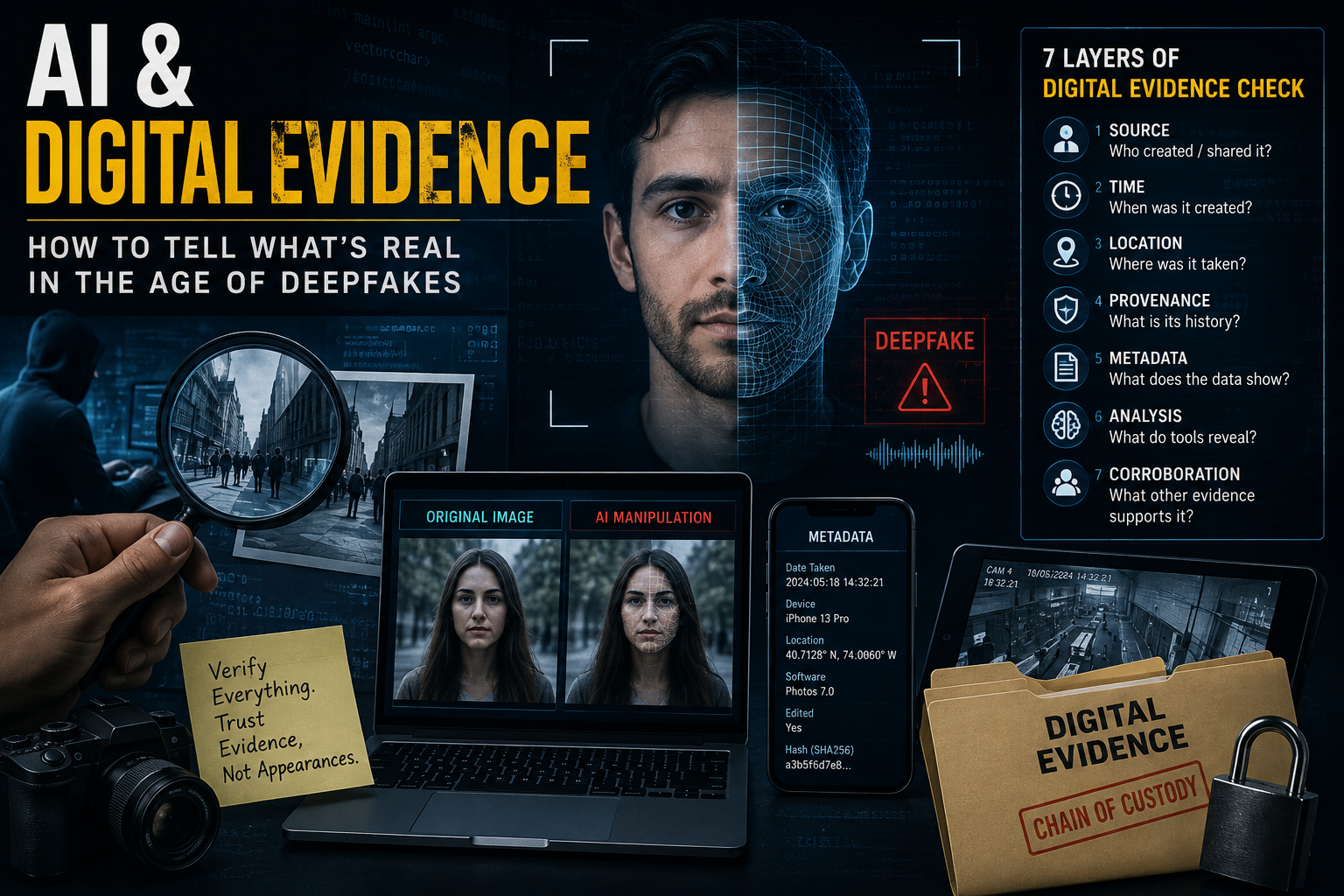
Source + Context + Date + Metadata + Independent Confirmation + Technical Analysis
The more important the claim, the stronger the verification should be.
11. Check Metadata When Available
Digital files can contain metadata describing aspects of their creation or modification.
Depending on the file, metadata may include:
- Creation information
- Modification information
- Device information
- Software information
- Location information
Metadata can sometimes provide useful clues.
However, metadata can be removed, changed, or lost when a file is uploaded to a platform.
Therefore:
Missing metadata does not prove that something is fake.
Likewise, metadata alone should not be treated as proof that an image or recording is genuine.
12. Look at the Account Sharing It
The content itself isn’t the only evidence.
Investigate the account publishing it.
Look at:
- Account age
- Previous posts
- Username history
- Claimed identity
- Posting patterns
- Sudden changes in activity
- Other accounts sharing the same material
A newly created account that immediately begins publishing sensational content deserves more scrutiny than an established source with a documented history.
Again, this is a risk indicator, not proof of deception.
13. Separate the Media From the Claim
This is one of the most important principles in digital evidence.
An image can be real while the story attached to it is false.
A video can be genuine while being presented without context.
An authentic voice recording can be edited to change its meaning.
So investigate two separate questions:
Is the media authentic?
And:
Is the claim about the media accurate?
These are not the same question.
14. Watch for Emotional Manipulation
Deepfakes become particularly effective when they trigger strong emotions.
Be cautious when content immediately makes you feel:
- Anger
- Fear
- Shock
- Outrage
- Excitement
- Panic
Scammers and misinformation campaigns benefit when people share something before checking it.
Before reposting, pause and ask:
What evidence would I need before believing this?
A Simple Deepfake Investigation Workflow
When you encounter suspicious digital content, use this sequence:
STOP → SAVE → SOURCE → CHECK → COMPARE → VERIFY → DECIDE
Stop
Don’t immediately share or act on the content.
Save
Preserve the original post, URL, screenshot, and relevant information.
Source
Find out who originally published the material.
Check
Investigate dates, context, metadata, and visual or audio inconsistencies.
Compare
Search for independent reporting and other versions of the content.
Verify
Look for authoritative or direct confirmation.
Decide
Only then determine how much confidence you should place in the claim.
What If the Deepfake Is Being Used in a Scam?
AI-generated media can be combined with traditional social-engineering techniques.
For example, a scammer might impersonate a company executive using:
- A cloned voice
- A fake video call
- A realistic profile photograph
- A spoofed email address
The goal may be to convince an employee to transfer money or reveal confidential information.
Never authorize a sensitive transaction solely because you hear or see a familiar person.
Use a separate, trusted communication channel to confirm important requests.
What If You Discover a Fake Image or Video?
Don’t amplify it unnecessarily.
Instead:
- Save relevant evidence.
- Record the original URL.
- Document what was claimed.
- Find the earliest available source.
- Compare independent evidence.
- Report the content through the appropriate platform or authority when necessary.
- Avoid publishing private information about suspected individuals.
The goal should be verification and responsible reporting, not online vigilantism.
Can You Always Tell If Something Is AI-Generated?
No.
There is no universal visual clue, detector, or single test that can reliably identify every AI-generated image, video, or audio recording.
Technology continues to change, and detection methods have limitations.
That makes provenance, context, corroboration, and source verification increasingly important.
A Practical Checklist
Before believing or sharing suspicious digital content, ask:
- Who created it?
- Where did it first appear?
- When was it published?
- Is there an original version?
- Can the image be reverse-searched?
- Does the video have missing context?
- Does the audio match the claimed speaker?
- Can independent sources confirm the event?
- Does metadata provide useful information?
- Is the account trustworthy and established?
- Could the content be designed to trigger an emotional reaction?
- What evidence would prove the claim wrong?
If you cannot answer these questions, don’t treat the content as established fact.
Final Thoughts
AI has changed what digital evidence looks like.
A photograph is no longer automatically persuasive simply because it looks realistic. A familiar voice does not necessarily prove who is speaking. A convincing video does not guarantee that the event happened as described.
The solution isn’t to distrust everything.
It is to verify before you believe or share.
Start with the source. Check the date. Find the original. Examine the context. Compare independent evidence. Investigate the account behind the content. Use technical tools carefully, and never treat a single detection result as absolute proof.
Most importantly, separate what you can observe from what someone claims it means.
In a world where AI can manufacture convincing digital media, the most valuable skill may not be spotting every deepfake by sight.
It may be learning how to question, verify, and follow the evidence.
Frequently Asked Questions
What is a deepfake?
A deepfake is manipulated or synthetic media created or altered using artificial intelligence. It can involve images, video, audio, or combinations of different media.
How can I tell if an image is AI-generated?
Look for inconsistencies in details such as hands, text, reflections, shadows, and background objects, but don’t rely on visual inspection alone. Check the source, date, context, and independent evidence as well.
Can AI-generated videos be detected?
Some detection tools can identify indicators associated with synthetic media, but no detection method should be treated as universally reliable. Source verification and corroborating evidence remain important.
Can a voice recording be AI-generated?
Yes. Voice-cloning systems can produce synthetic speech that resembles a real person’s voice. For important claims, verify the speaker through an independent source.
Are AI detection tools accurate?
They can provide useful signals but can also produce false positives and false negatives. A detector’s result should be considered one part of a broader investigation.
Does missing metadata mean an image is fake?
No. Social-media platforms and other services can remove metadata when files are uploaded or processed. Missing metadata alone does not establish that media is fraudulent.
What should I do before sharing a suspicious video?
Find the original source, check the date, look for the complete recording, search for independent reporting, and determine whether the claim has been independently verified.
Why are deepfakes dangerous?
Deepfakes can be used for impersonation, scams, misinformation, fraud, harassment, and manipulation. Their increasing realism makes source verification and digital literacy more important.