







Sit in one position long enough and your body starts complaining — stiff shoulders, a sore lower back, that restless feeling by 3pm. Alternating between sitting and standing helps, but not everyone wants to buy a whole new desk to get there.
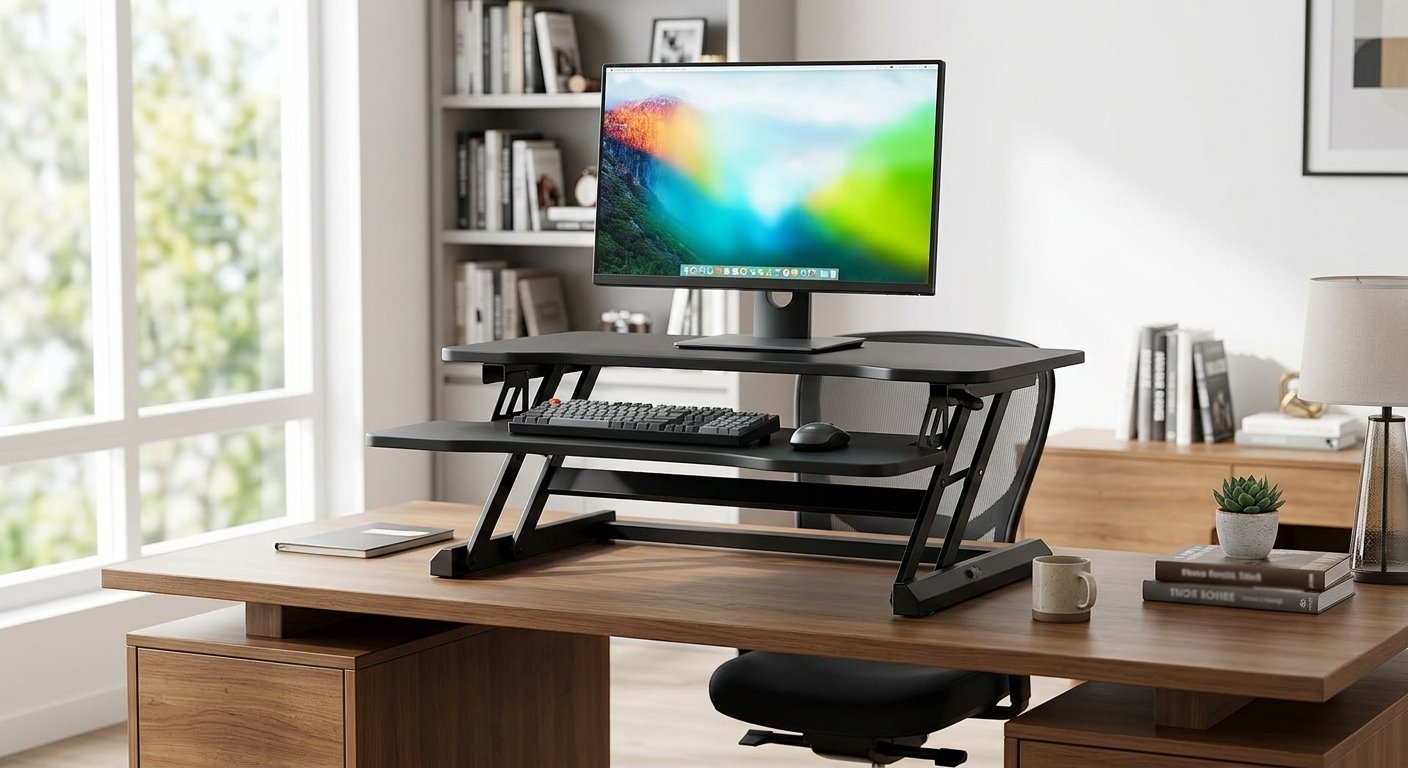
That’s where a riser desk comes in. It’s a platform that sits on top of the desk you already own and lifts your monitor, keyboard, and mouse to a better height. Raise it to stand, lower it to sit, and your actual desk never has to move.
You’ll also see it called a desk riser, standing desk converter, or sit-stand converter — different names, same idea.
How a riser desk actually works
At its core, it’s just a platform with a lifting mechanism underneath. What kind of mechanism depends on the price and design.
Manual risers you adjust by hand, usually locking into set positions. Simple, cheap, no cords — fine if you’re not switching heights every hour.
Gas-spring risers use a counterbalance, so you pull a lever and the platform glides up or down with minimal effort. No electricity needed, and the motion feels smoother than a manual lift.
Electric risers move at the push of a button. They’re the most convenient option if you actually change position often during the day, but you’ll pay more for the motor and the added complexity.
Fixed-height risers are a bit of an outlier — they raise your monitor but don’t adjust for sitting versus standing. If your only complaint is a screen that sits too low, that might be all you need. If you want to stand for part of the day, you’ll want an adjustable one instead.
The main types you’ll come across
Dual-tier risers split the monitor and the keyboard onto two separate levels, which makes it easier to get both at the right height independently. Good match for a standard desktop setup with a separate keyboard and mouse.
Single-tier risers have one flat surface. Simpler, takes up less desk space, and works well for laptops or minimal setups.
Electric converters are the dual- or single-tier models with a motor built in — same idea, just automated.
Manual converters are the same thing without the motor, at a lower price.
Monitor risers deserve a mention here mostly so you don’t confuse them with the rest. They just lift your screen — they’re not built to hold a keyboard and mouse or support standing work. If that’s genuinely all you need, don’t overspend on a full converter.
What you actually get out of one
You can stand without replacing your desk. That’s the whole pitch. You’re not committing to standing all day — you’re just adding the option, so you’re not locked into one position for eight hours straight.
Better ergonomics, if you set it up right. A monitor that’s too low, a keyboard that’s too far away, a mouse that makes you reach — these add up over a workday. A properly adjusted riser can fix a lot of that. But it’s not automatic; the riser, your chair, and your posture all have to work together.
You keep the desk you already like. If your current desk has the drawers, the storage, or the look you want, a riser lets you upgrade its function without touching any of that. Especially handy in a home office, a small apartment, a dorm, or a rental where you can’t exactly bolt down new furniture.
It’s a lower-stakes way to try sit-stand work. A full standing desk is a real commitment — new furniture, more money, no going back easily. A riser lets you test whether standing while you work actually suits you before you invest further.
Is it actually ergonomic, though?
Only if the whole setup is dialed in. Plenty of people raise their monitor and call it done, then leave the keyboard sitting too low or too far away — and end up trading one problem for another.
What you’re aiming for: head roughly upright, shoulders relaxed, elbows close to your body, wrists more or less straight, monitor right in front of you, keyboard and mouse within easy reach. None of that happens automatically just because the platform goes up and down. You still have to adjust it.
How high should it be?
There’s no universal number — it depends on your height, your existing desk, your monitor size, even your shoes. A few things to check once you’re standing at it:
- You’re not tipping your head up or down to see the screen
- Your shoulders aren’t creeping up toward your ears
- Your elbows stay close to your sides, not stretched forward
- Your wrists aren’t bent at an angle
- The keyboard and mouse are close enough that you’re not reaching
OSHA’s general guidance for monitor placement is to keep the top of the screen at or just below eye level. Beyond that, ignore the “ideal height” numbers on the box and adjust it to your own body.
Riser desk vs. full standing desk
| Riser Desk | Full Standing Desk | |
|---|---|---|
| Sits on your existing desk | Yes | No |
| Replaces your desk | No | Yes |
| Whole desktop moves together | No | Yes |
| Works sitting and standing | Yes | Yes |
| Typically easier to set up | Yes | Not always |
The short version: a riser adds sit-stand flexibility to a desk you already like. A full standing desk gives you one continuous surface that moves as a unit — better if you need a lot of open desktop space, but a bigger purchase and a bigger commitment.
Riser desk vs. monitor stand
A monitor stand just lifts your screen. A riser desk (or standing desk converter) lifts your whole working setup and lets you use it sitting or standing. If your screen height is the only issue, a stand is cheaper and simpler. If you want to actually stand and work, you need the converter.
What to check before buying one
Weight capacity. Add up everything that’s actually going on the platform — monitor, laptop, keyboard, mouse, speakers, a monitor arm, a docking station — not just the monitor by itself. Dual-monitor setups especially need a real look at the rating, not a guess.
Height range. Check both ends. Too short at the top and you’ll lean forward to stand comfortably; too tall at the bottom and sitting gets awkward. Your height and your desk’s own height both factor in.
Platform size. Measure your desk and your gear before you order. Cramming a big monitor, a full keyboard, and a mouse onto an undersized platform gets old fast.
Stability. Some risers feel solid at low height and start wobbling once fully extended — especially with dual monitors, monitor arms, or a heavy laptop on board. A desk that shakes every time you type is worse than no riser at all.
Adjustment method. Occasional standing? Manual is fine. Switching positions several times a day? The smoother motion of gas-spring or electric is worth the extra cost.
Keyboard and mouse position, not just the monitor. It’s easy to fixate on screen height and forget the keyboard needs to sit at a comfortable distance too. If it’s too far or too high, you’ll end up reaching or hunching your shoulders without noticing.
Where it falls short
It eats into your desk space — less room for notebooks, papers, or anything else you keep on the surface. Larger converters can be heavy and awkward to move if you rearrange often. Cheaper models can wobble, particularly when loaded up with heavier gear. And no riser fixes posture on its own — your chair, screen distance, and habits still matter just as much. Compared to a full standing desk, you’re also working with less total surface area, since only the platform itself moves.
Who it makes sense for
Probably worth it if you work from home, spend hours at a computer daily, already like your desk, have limited space, or just want to try standing work without a big commitment.
Probably skip it if you need a large, uninterrupted desktop, or your equipment genuinely won’t fit on a converter platform.
Setting one up properly
Once it’s on your desk, a few adjustments make a real difference:
- Monitor first. Put it directly in front of you, top of the screen at or just below eye level. You shouldn’t be tilting your head to see it.
- Then the keyboard. Close enough that your elbows stay near your body and your wrists stay roughly straight.
- Mouse next to it. Too far away and you’ll be reaching with your shoulder all day.
- Stand and check yourself. Are you leaning in, hunching, craning your neck? Adjust the height until you’re not.
- Actually alternate. Buying a converter doesn’t mean you owe it eight hours of standing. Switch between sitting and standing through the day, and take breaks to move regardless of which one you’re doing.
FAQ
What is a riser desk used for? Raising your monitor, keyboard, and mouse to a comfortable height so you can work sitting or standing, without replacing your existing desk.
Is a riser desk the same as a standing desk? No — a riser sits on top of your current desk and lifts what’s on it. A standing desk replaces the desk itself and moves as one surface.
Can you use one with a laptop? Yes, and it’s a common setup. Pairing it with an external keyboard and mouse lets you position the screen and your hands separately, which is usually more comfortable than typing directly on the laptop.
Do they actually improve posture? They can help, but they’re not automatic. Monitor height, keyboard position, your chair, and your habits all still matter.
Can one hold two monitors? Some can — check the weight capacity, platform size, and stability specs before you set up a dual-monitor arrangement.
Is a standing desk converter different from a riser desk? Not really — they’re generally the same product by two different names.
Does it need installation? Usually not much. Most just sit on your desk as-is, though heavier accessories like monitor arms might need extra setup.
Will it help with back pain? Changing position through the day may make things more comfortable for some people, but it’s not a treatment for back pain. See a healthcare professional for anything persistent or severe.
Bottom line
A riser desk gets you sit-stand flexibility without replacing your desk — that’s really the whole appeal. Before buying, pay attention to height range, stability, weight capacity, and platform size more than anything else. And once you have one, don’t treat standing as the goal in itself. The real benefit is being able to change position whenever you need to, instead of being stuck in one all day.
What is a riser desk? Learn how desk risers work, their benefits, types, height requirements, drawbacks, and how to set up a sit-stand workstation.